


This guide is written for surveyors, GIS professionals, engineers, and drone service providers who need to understand the full drone mapping survey workflow, from mission planning through data delivery. We cover the decisions that actually affect your output quality: flight parameters, sensor choice, positioning methods, processing constraints, and the software that ties it all together.
If you're building a drone mapping practice from scratch or tightening up an existing operation, this is the reference you'll keep coming back to.
What Is Drone Mapping?
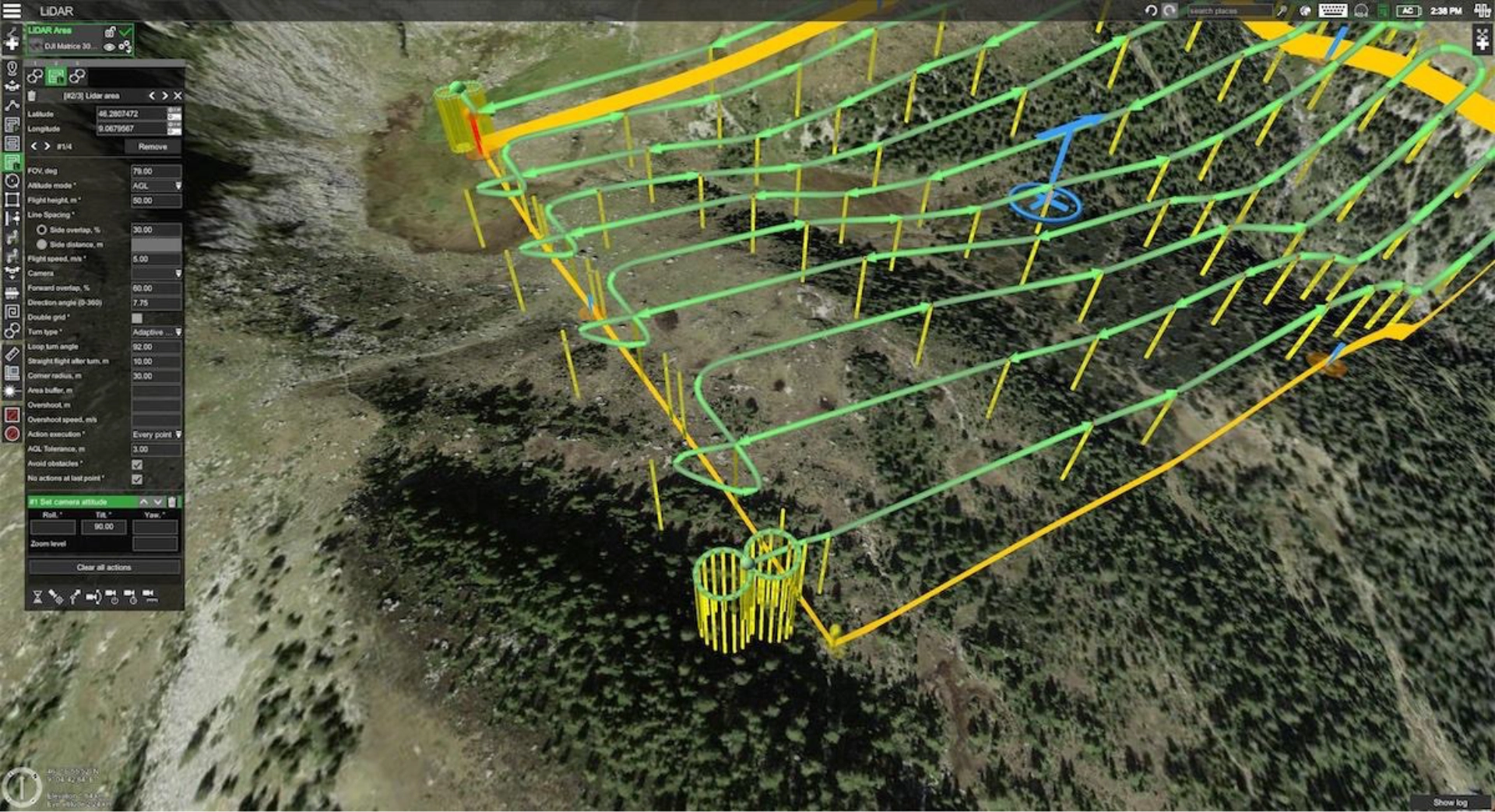
Drone mapping (also called UAV mapping) is the process of using UAVs equipped with cameras, LiDAR sensors, or multispectral imagers to collect georeferenced aerial data that can be processed into measurable 2D and 3D outputs. Orthomosaics, digital elevation models, point clouds, 3D meshes, and thermal overlays are all standard deliverables. The convergence of drones and mapping technology has made it possible to capture survey-grade spatial data in hours rather than weeks.
This is different from aerial photography. A real estate photographer takes pretty pictures. A drone mapping professional captures overlapping, geotagged imagery at controlled altitudes with precise overlap ratios, then processes that data into spatially accurate models that engineers, surveyors, and project managers can measure from.
It's also different from drone inspection, where the goal is visual assessment of a specific asset (a bridge, a rooftop, a powerline). Drone mapping produces data that covers an entire area at uniform resolution.
Key Terminology in Drone Mapping
Before we go deeper, here are the terms you'll see throughout this guide:
- Ground Sampling Distance (GSD): The real-world size each pixel represents. At 2 cm/px GSD, one pixel covers 2 cm on the ground. Lower GSD means higher resolution, which requires flying lower.
- Overlap (front and side): The percentage of shared area between consecutive images. Photogrammetry typically requires 75-85% frontal overlap and 60-70% side overlap to produce accurate reconstructions.
- AGL (Above Ground Level): Flight altitude measured relative to the terrain surface directly below the drone, not sea level. Maintaining consistent AGL is critical for uniform GSD.
- AMSL (Above Mean Sea Level): Absolute altitude. Useful for airspace compliance but not for mapping accuracy, since terrain height varies.
- DEM (Digital Elevation Model): A 3D representation of terrain elevation. DEMs are both an input to flight planning (for terrain following) and an output of drone mapping.
- GCP (Ground Control Point): A physical point on the ground with known coordinates, used to improve positional accuracy during processing.
- RTK (Real-Time Kinematic): GNSS correction method that provides centimeter-level positioning during flight via a continuous radio link to a base station.
- PPK (Post-Processed Kinematic): GNSS correction applied after the flight, using recorded raw satellite data. No real-time radio link needed.
- Photogrammetry: The science of extracting 3D measurements from 2D photographs using Structure from Motion (SfM) algorithms.
- Point Cloud: A dataset of millions of individual 3D points, each with X, Y, Z coordinates. Generated by LiDAR or dense photogrammetric matching.
- Orthomosaic: A single, geometrically corrected aerial image stitched from hundreds or thousands of overlapping photos. Measurements taken from an orthomosaic are spatially accurate.
Outputs and Accuracy of Drone Mapping
Under the right conditions, photogrammetry drone mapping achieves horizontal accuracy within 2-3 cm and vertical accuracy within 3-5 cm. LiDAR-based mapping can reach similar or better vertical accuracy. These numbers assume proper GCP placement (or direct georeferencing via RTK/PPK correction), consistent flight parameters, and correct processing workflows. Skip any of those steps and accuracy degrades fast.
How Drone Mapping Solves Real-World Challenges
Drone mapping replaces slow, expensive, and sometimes dangerous ground-based data collection with fast, repeatable aerial surveys. The specific value depends on the industry.
- Construction: Track earthwork progress, calculate cut-and-fill volumes, and generate as-built models without shutting down active sites. Regular drone surveys (weekly or bi-weekly) give project managers current site conditions overlaid against design surfaces in GIS or BIM (Building Information Modeling) platforms. A 50-hectare site that takes a ground crew a week to survey can be flown and processed in a single day.
- Agriculture: Monitor crop health across hundreds of hectares using NDVI and multispectral imagery. Identify stressed areas before they're visible to the eye. Drone mapping surveys at consistent altitude and resolution provide the uniform data that precision agriculture algorithms depend on. Research at Dalhousie University demonstrated that UgCS Circlegrammetry (circular flight paths with oblique imagery) reduced mapping time by 64% compared to standard methods for precision agriculture photogrammetry.
- Mining: Measure stockpile volumes with centimeter accuracy, track pit wall stability over time, and maintain current terrain models for blast planning. Drone mapping survey data feeds directly into mine planning software. Remote and connectivity-limited mining sites need flight planning tools that work fully offline, with cached maps and pre-loaded elevation data.
- Academic Research: Repeat identical survey patterns over months or years for longitudinal environmental studies. Researchers at the University of Nevada used drone mapping with multispectral sensors and UgCS terrain following to monitor the endangered Peirson's Milkvetch across desert dunes, achieving 93% detection accuracy. The ability to re-fly the exact same mission parameters was critical for comparing data across a three-year study.
- Energy and Utilities: Inspect and map powerline corridors, pipeline routes, and solar farms. Corridor mapping across hundreds of kilometers requires automated flight paths with terrain following to maintain safe altitude over hills and valleys. Trident Industries reduced mission planning time by 70% and field execution time by 30-40% when mapping transmission lines across Missouri and Illinois by switching from manual waypoint planning to automated corridor tools.
Environmental Monitoring: Map erosion patterns, track forest density changes, assess flood damage. Thermal mapping identifies heat anomalies. LiDAR penetrates vegetation canopy to measure the ground surface beneath.
Drone Mapping Mission Requirements
Before you plan a flight, you need to confirm you have the right foundation in place.
Regulatory clearance. You need a commercial drone pilot certification in your jurisdiction (FAA Part 107 in the US, A2 CofC or STS authorization under EASA in Europe). Check airspace restrictions for your survey area. Controlled airspace near airports requires additional waivers or LAANC authorization. Some sites require landowner permission or additional permits.
Hardware matched to the job. Your drone platform, sensor, and GNSS setup must match the deliverable your client expects. A DJI Mavic 3 Enterprise with an RTK module handles many standard photogrammetry jobs. A DJI Matrice 350 RTK with a Zenmuse L2 allows to do LiDAR corridor mapping. Multispectral work requires specialized payloads.
Site reconnaissance. Identify takeoff/landing zones, obstacles (power lines, trees, structures), terrain elevation changes, and any hazards. For sites with significant elevation variation, you'll need Digital Elevation Model data to plan terrain-following flights.
Defined deliverables and accuracy requirements. Know what your client needs before you fly. An orthomosaic for progress tracking has different requirements than a DTM for cut-and-fill calculations. Accuracy specs drive your GSD, which drives your altitude, which drives your overlap settings and flight duration.
Appropriate flight planning software. Tablet-based planning apps work for simple rectangular areas on flat ground. Complex terrain, long corridors, large areas requiring multi-battery flights, or missions with LiDAR sensors need desktop flight planning with DEM import, 3D mission preview, and automated battery segmentation.
Drone Mapping Workflow Explained
Every drone mapping project follows the same core workflow. The quality of your final deliverable depends on executing each stage correctly. Here's the high-level process, with each stage covered in detail below.
Stage 1: Project Scoping and Planning
Define the survey area boundaries, required GSD, accuracy targets, and deliverable format. Import the area of interest from KML, CSV, or shapefile into your flight planning software. Check terrain elevation data for the area. Identify any obstacles or airspace restrictions.
Pre-flight planning is where most mapping failures actually begin. Under-scoping the accuracy requirement, choosing the wrong altitude, or failing to account for terrain variation will produce data that can't meet the client's spec, no matter how well you fly.
Stage 2: Flight Planning
Set your flight parameters: altitude (driven by target GSD), overlap percentages, flight speed, camera trigger interval, and flight pattern type. For photogrammetry, standard grid patterns with 75-80% frontal overlap and 65-70% side overlap are typical. For 3D modeling of structures, add crosshatch (double-grid) patterns or oblique passes.
If your site has more than 20-30 meters of elevation change, flat-altitude planning will produce inconsistent GSD. The drone will be too high in valleys (coarser GSD, less detail) and too low on hilltops (risk of obstacle collision). Terrain-following mode, where the drone adjusts altitude based on DEM data to maintain constant AGL, solves this. The quality of your terrain following depends directly on the resolution of your DEM and the capability of your flight planning software.
Review the mission in 3D before flying. Check the elevation profile. Verify clearance over obstacles. Confirm battery requirements and break points.
Stage 3: Ground Control Setup (If Required)
Place GCPs across the survey area before flying. Standard practice is 5-10 GCPs for most sites, distributed evenly, including at the edges and center. Measure each GCP with a survey-grade GNSS receiver. If using RTK or PPK instead of GCPs (or in combination), verify your base station setup or CORS connection.
Stage 4: Data Capture
Fly the planned mission. Monitor for wind conditions, battery levels, and any deviations. For multi-battery missions, execute battery swaps at the planned points and confirm the mission resumes from the correct location without gaps.
The biggest field errors: forgetting to check camera settings before launch, not verifying RTK fix status, flying in wind conditions that cause image blur, and poor battery management that leaves coverage gaps.
Stage 5: Processing
Import captured images into photogrammetry software . The software aligns images, generates a sparse point cloud, builds a dense point cloud, and produces your deliverables: orthomosaic, DEM/DSM/DTM, 3D mesh, contour maps, or volume calculations.
Processing time depends on the number of images, your hardware, and the output type. A 200-image site survey might process in 30 minutes on a modern workstation. A 5,000-image corridor scan could take hours.
Stage 6: Quality Control and Delivery
Check your outputs against GCPs or known reference points. Verify accuracy meets the project spec. Export in the required formats (GeoTIFF, LAS/LAZ, DXF, OBJ) and deliver to the client through their preferred platform.
Where Most Errors Occur
In practice, the majority of drone mapping failures trace back to three stages:
- Planning. Wrong altitude for the required GSD. No terrain following on hilly sites. Insufficient overlap.
- Field execution. Missed GCPs. RTK connection lost mid-flight. Coverage gaps from poor battery management.
- Processing. Incorrect coordinate system. Missing GCP measurements. Under-processed point clouds.
Invest your time in planning and field execution. Processing software is mature enough that it rarely introduces errors on its own.
Types of Drone Maps
Drone mapping produces a range of output types. Each serves a different purpose.
Orthomosaic Maps
A single, geometrically corrected aerial image covering the entire survey area. Every pixel is georeferenced. You can take accurate distance, area, and perimeter measurements directly from the image. Orthomosaics are the most widely used drone mapping output across all industries.
Digital Elevation Models (DEMs)
A general term for any raster dataset representing elevation. DEMs include both DSMs and DTMs (below). The term is sometimes used interchangeably with DTM, depending on the software and region.
Digital Surface Models (DSMs)
A model showing the elevation of everything on the surface: buildings, trees, vehicles, structures. A DSM of a construction site shows the rooftops, cranes, and stockpiles along with the terrain.
Digital Terrain Models (DTMs)
A model of the bare earth surface with all above-ground objects removed. DTMs are essential for volume calculations, drainage analysis, and grading plans. Generating accurate DTMs requires either LiDAR (which can penetrate vegetation) or photogrammetric processing with good ground visibility.
3D Maps Using Photogrammetry
Drone 3D mapping through photogrammetry creates detailed meshes and textured models from overlapping drone imagery. Used for building inspections, heritage documentation, and visual project communication. Techniques like circlegrammetry (circular flight paths with oblique camera angles) produce better 3D coverage of complex shapes with fewer images and less flight time than traditional grid-and-crosshatch approaches.
3D Maps Using LiDAR Data
LiDAR point clouds produce extremely dense 3D representations. Unlike photogrammetry, LiDAR works in low-light conditions and penetrates vegetation. LiDAR-based 3D maps are the standard for forestry, powerline corridor mapping, and any project where you need to see through canopy.
Contour Maps
Elevation contours derived from DEMs, showing lines of equal elevation. Used for topographic surveys, site grading plans, and drainage design. Most processing software exports contours at user-defined intervals.
Thermal Maps
Heat distribution maps captured with thermal infrared sensors. Applications include solar panel inspection (identifying failed cells), building energy audits, search and rescue, and environmental monitoring.
NDVI Maps
Normalized Difference Vegetation Index maps use multispectral data to measure plant health. Healthy vegetation reflects more near-infrared light and absorbs more red light. NDVI values range from -1 to +1, where higher values indicate healthier, denser vegetation. Critical for precision agriculture, forestry, and environmental assessment.
Volumetric Maps
Volume calculations derived from DSMs or DTMs. Used to measure stockpile volumes in mining and construction (gravel, soil, aggregate), track cut-and-fill progress, and verify material quantities for billing.
Flight Planning Fundamentals for Mapping Accuracy
Flight planning is where mapping accuracy is won or lost. Every parameter you set directly affects the quality of your final deliverable.
Altitude and GSD
Your flight altitude determines your Ground Sampling Distance. The relationship is fixed by your camera's sensor size and focal length. For a DJI Zenmuse P1 (45MP, 35mm lens), flying at 100m AGL produces roughly 1.2 cm/px GSD. At 60m, you get about 0.7 cm/px. At 8m AGL, researchers at MeteoSwiss achieved 1 mm/px for hailstone measurement, a resolution impossible above 12m with standard DJI flight apps. Calculate your required altitude before you plan anything else.
Overlap
More overlap means more image matches for the photogrammetry algorithm, which means better accuracy. Standard recommendations: 75-80% frontal, 65-70% side overlap for general mapping. For 3D modeling, bump both to 80%+. For vegetation-heavy areas, go higher still. More overlap means more images, more flight time, and longer processing, so balance accuracy needs against operational constraints.
Flight Speed
Faster flight speed means fewer images captured per area (if trigger intervals stay constant) and increased risk of motion blur, especially at low altitudes. Most mapping missions fly at 5-10 m/s. Reduce speed for low-altitude work or when using mechanical shutters.
Terrain Following
On flat ground, a constant AMSL altitude works fine. On anything with more than 10-15 meters of elevation change across the survey area, you need terrain following to maintain consistent AGL and therefore consistent GSD. The quality of terrain following depends on the resolution of your DEM data and how frequently the flight planner recalculates altitude. Higher-resolution DEMs (0.5-3m) produce smoother, more accurate terrain-following paths than coarse 30m SRTM (Shuttle Radar Topography Mission) data.
Camera Trigger Mode
Distance-based triggering (one photo every X meters) maintains consistent overlap regardless of wind conditions or speed variation. Time-based triggering (one photo every X seconds) is simpler but can produce uneven overlap if the drone speeds up or slows down.
Flight Pattern
Grid (lawnmower) for standard orthomosaics. Double-grid (crosshatch) for 3D models. Circular patterns for complex structures. Corridor patterns for linear features like roads, pipelines, and powerlines.
Battery Management
For missions that exceed one battery, your flight planner should segment the mission automatically and define swap points. The mission should resume from the exact point it paused, without overlap gaps. Incomplete coverage from a missed segment means re-flying, which costs time and money.
Data Capture: Hardware, Sensors, and Field Best Practices
Drone Platforms Used in Mapping
The recommended drone platform you choose depends on your area size, required payload, flight time needs, autonomous flight capabilities, and regulatory environment.
Multirotor drones are the standard for most mapping work. They handle areas up to a few hundred hectares efficiently, offer vertical takeoff and landing, and support a wide range of payloads. Common platforms include the DJI Matrice 350 RTK (the workhorse for professional survey), DJI Mavic 3 Enterprise, Freefly Astro, and Inspired Flight IF1200A (NDAA-compliant for US government work).
Fixed-wing drones cover large areas more efficiently. Platforms like the senseFly eBee X or WingtraOne can map hundreds of hectares on a single battery. The trade-off is less flexibility for complex terrain and no ability to hover.
VTOL (Vertical Takeoff and Landing) hybrids combine the launch flexibility of a multirotor with the endurance of a fixed wing. Useful for large linear projects where you need both coverage and takeoff convenience.
Most professional flight planning software, including UgCS, supports DJI, ArduPilot, PX4, and other autopilot platforms. This matters when your fleet includes multiple drone types or when a contract requires NDAA-compliant (non-Chinese-manufactured) platforms.
Sensor Types
RGB cameras produce standard color imagery for photogrammetry. Higher megapixel counts and larger sensors produce better GSD at the same altitude. The DJI Zenmuse P1 (45MP full-frame) and Phase One P3 (100MP medium format) are common choices for survey-grade work.
LiDAR sensors emit laser pulses and measure return time to calculate distance. They produce dense point clouds, work in low light, and penetrate vegetation. Systems like the DJI Zenmuse L2, YellowScan Mapper+, and RIEGL miniVUX are popular for surveys.
Multispectral sensors capture data across multiple wavelength bands (typically red, green, blue, red edge, and near-infrared). Used for NDVI calculation, crop stress analysis, and environmental monitoring. The MicaSense RedEdge-P is a common choice.
Thermal sensors detect infrared radiation. Used for solar panel inspection, building envelope assessment, and search and rescue.
GNSS Positioning
Every mapping drone uses GNSS (GPS, GLONASS, Galileo, BeiDou) for positioning. Standalone GNSS gives 2-5 meter accuracy, which is not sufficient for survey work. RTK, PPK, or GCPs are required to bring positioning accuracy down to centimeter level. See the RTK vs PPK vs GCPs section below for details.
RTK vs PPK vs GCPs: Achieving Survey-Grade Accuracy
This is one of the most misunderstood aspects of drone mapping. Each method has distinct advantages, and many professional operations use a combination.
RTK (Real-Time Kinematic)
The drone receives GNSS corrections in real time from a base station or CORS network. Each image is geotagged with corrected, centimeter-level coordinates as it's captured.
Best for: Sites with reliable base station coverage or cellular connectivity for CORS/NTRIP services. Fast turnaround projects where you want to minimize post-processing.
Limitations: Requires an uninterrupted radio or cellular link to the base station throughout the flight. If the link drops, accuracy degrades to standalone GNSS levels for those images. Not ideal for remote areas with poor connectivity.
Typical accuracy: 1-2 cm horizontal, 2-3 cm vertical (with good satellite geometry).
PPK (Post-Processed Kinematic)
The drone logs raw GNSS observations during flight. After landing, you combine this data with base station data in post-processing software to calculate corrected coordinates for each image.
Best for: Remote sites without cellular coverage. Long corridor missions where maintaining a real-time link is unreliable. Missions where you need consistent accuracy without depending on live infrastructure.
Limitations: Requires post-processing before you know your accuracy. You can't verify in the field that your data is good, which means issues might not surface until you're back in the office.
Typical accuracy: 1-2 cm horizontal, 2-3 cm vertical (comparable to RTK when processed correctly).
GCPs (Ground Control Points)
Physical targets placed on the ground before the flight, measured with a survey-grade GNSS receiver or total station. During processing, the software uses GCPs to tie the photogrammetric model to known real-world coordinates.
Best for: Projects requiring the highest possible absolute accuracy. Areas where RTK/PPK is unavailable. Validation checkpoints even when using RTK or PPK.
Limitations: Placing and measuring GCPs takes time, especially on large sites. You need access to the survey area on the ground. GCPs can be disturbed (kicked, moved, covered) between placement and flight.
Typical accuracy: 1-2 cm with well-placed GCPs and proper processing.
Hybrid Workflows
The most reliable approach combines methods. Use RTK or PPK for image geotagging, then place a smaller number of GCPs (3-5) as independent checkpoints to verify absolute accuracy. This gives you both the efficiency of direct georeferencing and the validation of ground truth.
Accuracy Expectations by Method
Processing Drone Mapping Data
Processing transforms your captured images into usable deliverables. The pipeline is largely automated, but understanding each stage helps you troubleshoot quality issues and set correct parameters.
Processing Stages
- Image alignment. The data processing software identifies matching features across overlapping images, calculates camera positions and orientations in 3D space through a process called bundle adjustment, and generates a sparse point cloud.
- Dense point cloud generation. Using the aligned camera positions, the software calculates depth for every pixel across all images, producing millions of 3D points.
- Mesh generation (optional). The point cloud is converted into a continuous 3D surface. Required for textured 3D models and some volume calculations.
- Orthomosaic generation. The software projects all images onto the 3D surface model and stitches them into a single, orthorectified image.
- DEM/DSM/DTM generation. Elevation models are interpolated from the point cloud or mesh.
- Export. Deliverables are exported in the formats required by your client or downstream GIS or CAD software: GeoTIFF for orthomosaics, LAS/LAZ for point clouds, DXF for contours, OBJ/FBX for 3D models.
The Role of Processing Software
Your processing software is where captured data becomes a deliverable. Common options include Pix4Dmapper, Agisoft Metashape, DJI Terra, and OpenDroneMap. Each has different strengths in accuracy, speed, supported outputs, and price. For a detailed comparison, see our guide to drone data processing software.
The important distinction: processing software is separate from flight planning software. Flight planning handles mission design, terrain following, camera control, and field execution. Processing handles what happens after you bring data back to the office. Some vendors (like DJI) bundle both, but most professional operations use dedicated tools for each stage because specialized software performs better at each job.
Processing Constraints
Hardware. Dense point cloud generation is GPU-intensive. Orthomosaic stitching is RAM-intensive. A workstation with 64GB+ RAM, a modern NVIDIA GPU, and fast SSD storage is recommended for large projects (1,000+ images).
Image count. More images means longer processing. A 200-image site takes minutes. A 10,000-image corridor scan can take a full day. Cloud processing services can speed this up but add cost.
Coordinate reference system. Set your project CRS correctly from the start. Mismatched coordinate systems between GCPs, RTK corrections, and processing software are a common source of absolute accuracy errors. Verify that your geoid model and vertical datum are consistent across all data sources.
Choosing the Right Drone Mapping Software
Drone mapping relies on two distinct categories of software: flight planning and data processing. Most discussions conflate the two, but they address different problems.
Flight Planning Software: What to Evaluate
Your flight planner controls everything that happens before and during the flight. It determines whether your captured data will be usable. Here's what matters:
- Terrain following capability. Can the software import high-resolution DEM/DSM data and recalculate altitude at each waypoint? When planning flights over steep or complex terrain the DEM resolution is highly important. The resolution of the DEM directly affects how closely the drone can follow the terrain and how accurate the result will be.
- Desktop vs. tablet planning. Planning a 200km corridor scan or a multi-battery mission over a 500-hectare site on a 7-inch tablet screen is impractical. Desktop interfaces with full-screen 3D preview, elevation profiles, and multi-segment route visualization reduce planning errors.
- Platform compatibility. If your fleet includes DJI and ArduPilot-basedNDAA-compliant platforms, you need software that supports all of them with the same workflow. Retraining pilots for every new drone platform wastes time and introduces errors.
- Sensor-specific tools. LiDAR missions need IMU calibration patterns, scan control, and turn optimization. Photogrammetry needs precise camera trigger control and overlap calculation. Corridor mapping needs linear path generation with terrain following. Generic flight apps lack these.
- Offline operation. Remote sites, mines, and rural survey areas often have zero cellular connectivity. Your flight planner needs to cache maps and elevation data before you leave the office.
- Mission repeatability. For ongoing monitoring projects, the ability to save and re-fly exact mission parameters months or years later is critical for comparable data.
UgCS addresses these requirements as a dedicated desktop flight planning platform. It imports custom DEM/DSM data for precise terrain following, supports 100+ drone platforms (DJI, ArduPilot, PX4, Freefly, and more), includes dedicated tools for LiDAR, photogrammetry, and corridor missions, and works fully offline. For a broader comparison of planning and processing options, see our drone mapping software guide.
Data Processing Software: What to Evaluate
- Accuracy controls. GCP management, RTK/PPK data import, coordinate system support, and quality reports.
- Output types. Orthomosaics, point clouds, DEMs, 3D meshes, contour maps, volume calculations. Make sure the software produces what your clients need.
- Speed and scalability. Processing time for large datasets. Cloud vs. local options. GPU acceleration support.
- Export formats. GeoTIFF, LAS/LAZ, DXF, OBJ, KMZ. Compatibility with downstream GIS and CAD software.
- Price. Perpetual license vs. subscription. Per-project pricing vs. unlimited processing.
Read our full review of top drone data processing software.
Limitations of Drone Mapping
Drone mapping is powerful but not without constraints. Understanding these limitations helps you set correct client expectations and plan around them.
Weather dependency
Wind above 10-12 m/s degrades image quality through motion blur and inconsistent altitude hold. Rain, fog, and snow prevent safe flying and degrade sensor data. Flight windows are weather-dependent, which affects project timelines.
Mitigation: Build weather contingency into your project schedule. Monitor wind conditions at altitude, not just ground level. Mechanical shutters reduce motion blur in moderate wind.
Battery life
Most commercial mapping drones fly 30-45 minutes per battery. Large areas require multiple batteries and multiple flights, which adds time and creates potential for coverage gaps at mission segment boundaries.
Mitigation: Use flight planning software that automatically segments missions by battery capacity and defines precise swap points with overlap at segment boundaries.
Airspace restrictions
Controlled airspace near airports, military zones, and national security areas may be off-limits or require waivers. Urban environments may have population overflight restrictions.
Mitigation: Check airspace before scoping the project. Factor waiver processing time into project timelines. Some jurisdictions offer automated authorization (LAANC in the US).
Vegetation and occlusion
Photogrammetry cannot see through vegetation, trees, or rooftops. The camera captures the surface, not what's underneath.
Mitigation: Use LiDAR for projects requiring bare-earth terrain models under vegetation. LiDAR pulses penetrate canopy gaps to measure ground elevation.
GSD vs. coverage trade-off
Higher resolution (lower GSD) requires flying lower, which reduces the area covered per flight line. A project that needs 1 cm/px GSD will take significantly longer to fly than one that needs 3 cm/px.
Mitigation: Match GSD to the actual deliverable requirement. Don't over-spec resolution for projects that don't need it.
Processing compute requirements
Large datasets (5,000+ images) require significant hardware. Processing can take hours or even overnight.
Mitigation: Invest in workstation hardware or use cloud processing services for large projects.
How to Scale Drone Mapping Operations
Scaling from occasional mapping jobs to a consistent operation requires systems, not just equipment.
Standardize your workflow
Document your flight parameters, GCP protocols, processing settings, and QC checks for each project type. When every pilot on your team follows the same workflow, data quality stays consistent regardless of who flies.
Template your missions
Save proven mission configurations for recurring project types (site monitoring, corridor mapping, stockpile surveys). Reusable templates reduce planning time and prevent parameter errors. Flight planning tools that save and share mission templates across teams make this practical.
Invest in fleet management
Multiple drones, multiple pilots, multiple active projects. You need a system to track which drone is where, which missions are assigned, and which data has been processed. Enterprise-tier flight planning software often includes multi-node deployment and centralized mission sharing for this purpose.
Build repeatable client packages
Standardize your deliverables, turnaround times, and pricing for common project types. Clients value predictability. "50-hectare orthomosaic with 2cm GSD, delivered in 48 hours" is a more compelling offer than "we'll fly your site and see what we get."
Automate where possible
Cloud-based processing, automated report generation, and integration with client GIS platforms reduce the manual effort per project and let you take on more work without proportionally increasing staff.
Getting Started with Drone Aerial Mapping
If you're moving into professional drone mapping, here's a practical starting point.
What You Need to Know
- Photogrammetry fundamentals. Understand how overlap, GSD, and camera geometry affect output quality. You don't need a PhD, but you need to know why flying at the wrong altitude ruins your data.
- GNSS positioning. Know the difference between standalone GPS, RTK, PPK, and GCP-based workflows. Understand when each is appropriate and how they affect your accuracy claims.
- Flight planning. Learn to plan missions using professional software, not just a tablet app. Practice terrain-following missions on sites with elevation variation. Learn to plan multi-battery missions without coverage gaps.
- Processing basics. Run at least a few projects through photogrammetry software from capture to final deliverable. Understand what each processing stage does and how to spot quality issues.
Training and Certification
- Regulatory certification is mandatory for commercial drone operations. In the US, that's FAA Part 107. In Europe, EASA's drone categories (Open, Specific, Certified) determine what you need based on your operation type. Check your local requirements.
- Technical training is just as important. Manufacturer training courses, industry webinars, and peer learning accelerate your competence faster than trial and error alone. SPH Engineering runs bi-weekly UgCS training webinars covering flight planning for specific applications, from LiDAR to photogrammetry to corridor mapping.
- Portfolio building. Start with small, low-stakes projects to build experience and a portfolio of deliverables. A few well-executed mapping projects demonstrate your capability to potential clients more effectively than any certification alone.
Common Questions About Drone Aerial Mapping
How accurate is drone mapping?
Under controlled conditions with RTK/PPK positioning and proper GCPs, drone mapping achieves 1-3 cm horizontal accuracy and 2-5 cm vertical accuracy. LiDAR-based mapping can reach similar or better vertical precision. Actual accuracy depends on your equipment, flight parameters, positioning method, and processing workflow. Always validate against known checkpoints.
Which industries benefit from drone mapping?
Construction, mining, agriculture, energy and utilities, environmental science, forestry, archaeology, real estate development, insurance, and infrastructure inspection all use drone mapping regularly. Any industry that needs current, accurate spatial data over defined areas can benefit.
What equipment do you need for drone mapping?
At minimum: a commercial drone with a geotagged camera, flight planning software like UgCS, and photogrammetry processing software for drone mapping. For survey-grade work, add RTK or PPK capability and GCP targets with a survey-grade GNSS receiver. For specialized applications, add LiDAR, multispectral, or thermal sensors. Budget range: $2,000-5,000 for basic photogrammetry setups, $15,000-50,000+ for full LiDAR survey systems.
Do I need a license to do drone mapping?
Yes, every jurisdiction requires some form of commercial drone pilot certification. In the US, FAA Part 107 is the standard. In Europe, EASA regulations apply. Many countries also require drone registration and may have additional requirements for specific operation types. Check your national aviation authority for current rules.
What is the difference between drone mapping and drone surveying?
Drone mapping produces georeferenced aerial imagery and derived products (orthomosaics, DEMs, 3D models). Drone surveying is a broader term that may include mapping but also refers to using drones for land surveys, topographic surveys, boundary determination, or engineering surveys, which often requires a licensed surveyor to sign off on the deliverables. If you're selling services, be careful with the word "surveying" unless you're a licensed surveyor or working under one.
How long does it take to map an area with a drone?
The flight time it takes to map an area depends on the area size, required GSD, overlap, and drone battery life. A rough guide: 10-20 hectares per battery at standard mapping altitude (80-120m AGL) with a multirotor. A 50-hectare site might take 3-4 battery flights. Add time for GCP placement, setup, and battery swaps. Processing adds hours to a day depending on image count and hardware. Total project turnaround: typically 1-3 days for a standard site.
Can drones map in bad weather?
Drones cannot map reliably in adverse weather conditions. Wind above 10-12 m/s causes motion blur and altitude instability. Rain damages sensitive electronics and degrades image quality. Low clouds and fog reduce visibility and prevent safe operations. Plan for weather contingency in every project schedule.
Drone aerial mapping is a skill that improves with every flight. The technology handles the heavy lifting, but the quality of your planning, field execution, and processing workflow determines whether you deliver good data or great data. Invest in the fundamentals, choose tools that give you precision control over your missions, and build systems that let you deliver consistent results at scale.
Ready to plan your next mapping mission? Try UgCS and see how desktop-grade flight planning changes your drone mapping workflow.